Malibu Script: A Modern Classic for Creative Projects
There's a certain magic in a typeface that feels both timeless and fresh. Malibu Script is one of those rare finds. At first glance, it presents the elegant flow of traditional calligraphy, but a closer look reveals a contemporary edge that makes it incredibly versatile. It's not just a script font; it's a bridge between classic sophistication and modern clarity. This balance is what gives it such wide appeal, allowing it to feel equally at home on a rustic wedding invitation and a sleek, branded coffee cup.
The Personality Behind the Glyphs
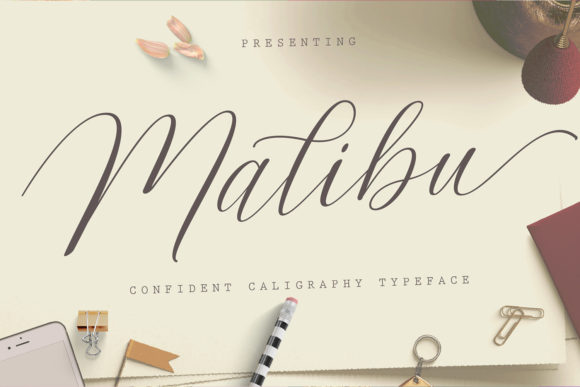
Every font has a voice, and Malibu Script speaks with confidence and warmth. Its letterforms feature a graceful, connected flow with natural, slightly varied stroke weights that mimic the hand of a skilled calligrapher. This organic quality avoids the rigid, mechanical feel of some digital scripts. The swashes and alternate glyphs are where its true personality shines. With PUA encoding, you have direct access to these extras, enabling you to add a flourish to a capital letter or a unique tail to a lowercase 'y' without any special software. This allows for a level of customization that can make a design feel truly bespoke.
Where This Creative Font Truly Excels
Understanding where to deploy a premium font like Malibu Script is key to leveraging its strengths. Its legibility at medium to larger sizes makes it a powerhouse for display purposes. Think of the projects where first impressions are paramount.
- Branding & Identity: For businesses in the lifestyle, wedding, fashion, or artisan food space, Malibu Script can form the core of a brand identity. It's perfect for logos, letterheads, and business cards, lending an immediate sense of personal touch and quality.
- Marketing & Packaging: On product labels, especially for boutique goods like candles, cosmetics, or gourmet foods, this typeface communicates care and craftsmanship. It catches the eye on packaging design and social media graphics, where a human touch can cut through digital noise.
- Editorial & Publishing: In editorial design, it works beautifully for magazine headers, pull quotes, or chapter titles. It adds a layer of elegance without sacrificing the readability of the body text, which should typically be a clean serif font or sans serif font.
- Events & Personal Use: From wedding invitations and save-the-dates to party banners and personalized gifts, Malibu Script sets a celebratory and intimate tone. Its versatility extends to web design for hero sections or accent text, provided it's used sparingly for impact.
Guiding the Eye: Hierarchy and Readability
Using a display font effectively is about more than just aesthetics; it's about communication. Malibu Script naturally draws the eye, making it an excellent tool for establishing visual hierarchy. By using it for your main headline or a key call-to-action, you immediately tell the viewer where to look first. This creates a clear path through your content, enhancing engagement.
However, its greatest strength—its expressive style—requires thoughtful application for readability. A common guideline is to avoid setting long paragraphs or small body copy in any script font. The intricacy that makes Malibu Script beautiful can become a strain on the eyes at 10-point size. For body text, pair it with a highly legible serif font for a classic look or a clean sans serif font for a more modern contrast. This pairing ensures your message is both seen and understood.
A Practical Guide to Choosing and Using Malibu Script
Before integrating any new design asset, a practical evaluation is essential. Here’s how to determine if Malibu Script is the right fit for your project:
- Evaluate the Project's Tone: Does your project call for elegance, personality, and a handcrafted feel? If you're designing for a corporate law firm, it's likely a mismatch. For a bakery, boutique, or creative portfolio, it's a strong candidate.
- Test Font Pairings: Create a simple mockup. Set your headline in Malibu Script and your subheading or body text in a neutral typeface. Does the combination feel balanced? A good pairing lets the script font shine without creating visual clutter.
- Review the Full Character Set: Don't just type A-Z. Explore the alternates and swashes. How do the numbers look? Are there specific ligatures or stylistic sets that solve a particular design problem for you? This exploration is crucial for logo design where every letter matters.
- Consider the Medium: Will this be viewed on a screen or printed? While it's a versatile commercial font, always test it at the intended size and in the final context. What looks elegant on a 27-inch monitor might need adjustment for a printed label.
- Understand the License: For any commercial use—whether for a client or your own business—ensure you have the correct license. This protects you legally and supports the type designers who create these valuable modern typography tools.
In the landscape of creative fonts, Malibu Script holds its own by offering a blend of artistic flair and functional design. It’s a tool for adding a signature, a story, and a sense of authenticity to your work. When used with intention, it doesn’t just decorate a page—it elevates the entire message.